UTILITY BILLS & REMINDERS
The small things, never late again.
Meter readings, bills, renewals — the obligations you keep in your head. Fill it in once. We'll remind you right before you need to act.
Works offline · No ads · Your data stays yours.
See every screen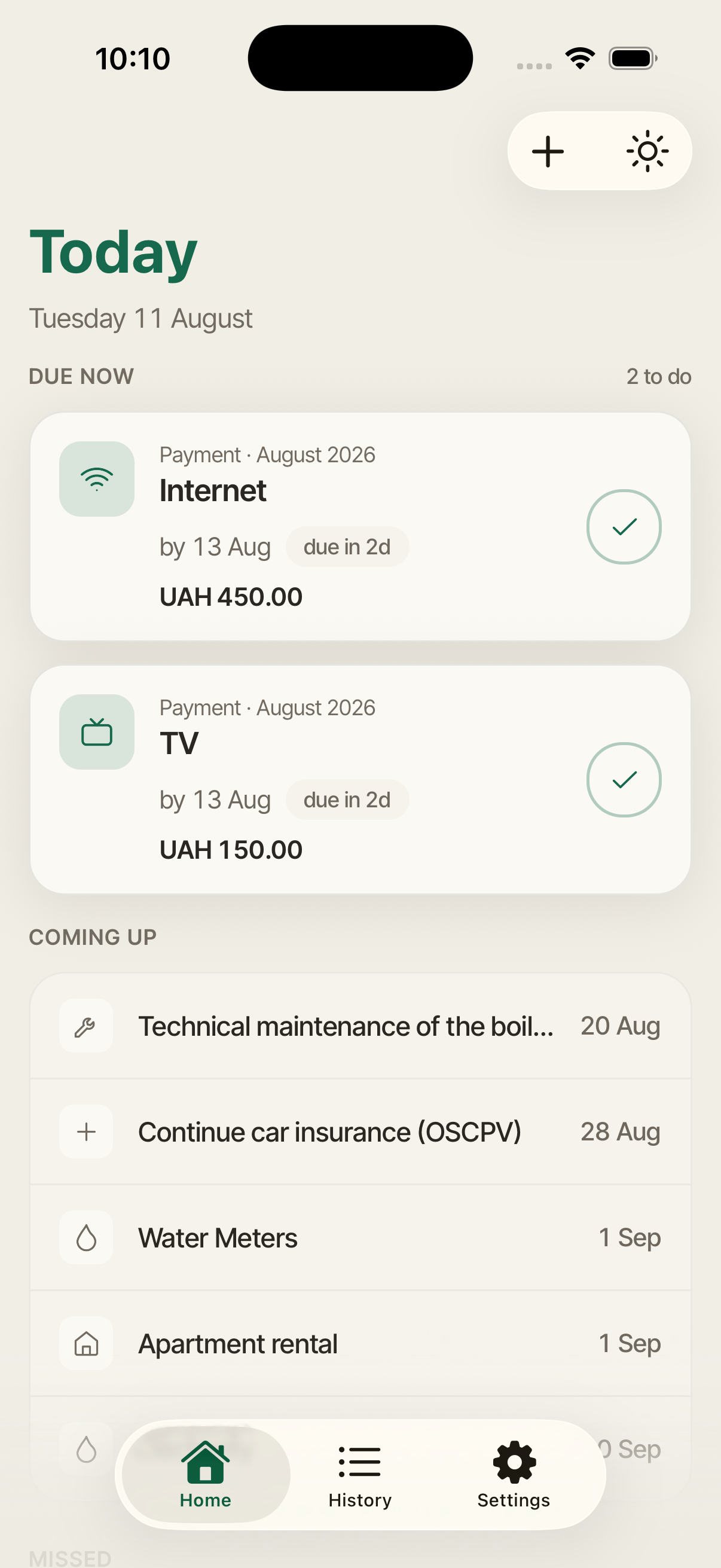
Section 01 — Home
Everything that's live, in one place.
01 · HOME
Due now. The window is open — these are the ones to act on today, with a count so you know what you're in for.
Coming up. What's next and by when — “by 22 July”, “due in 3 days”, “closes in 2 days”.
Missed. Nothing silently disappears. A missed reminder stays flagged until you handle it.
Add a reminder. One button, and about twenty seconds.
Section 02 — Creating a reminder
Three steps, and it reads back the plan.


02 · CREATE, STEP 1
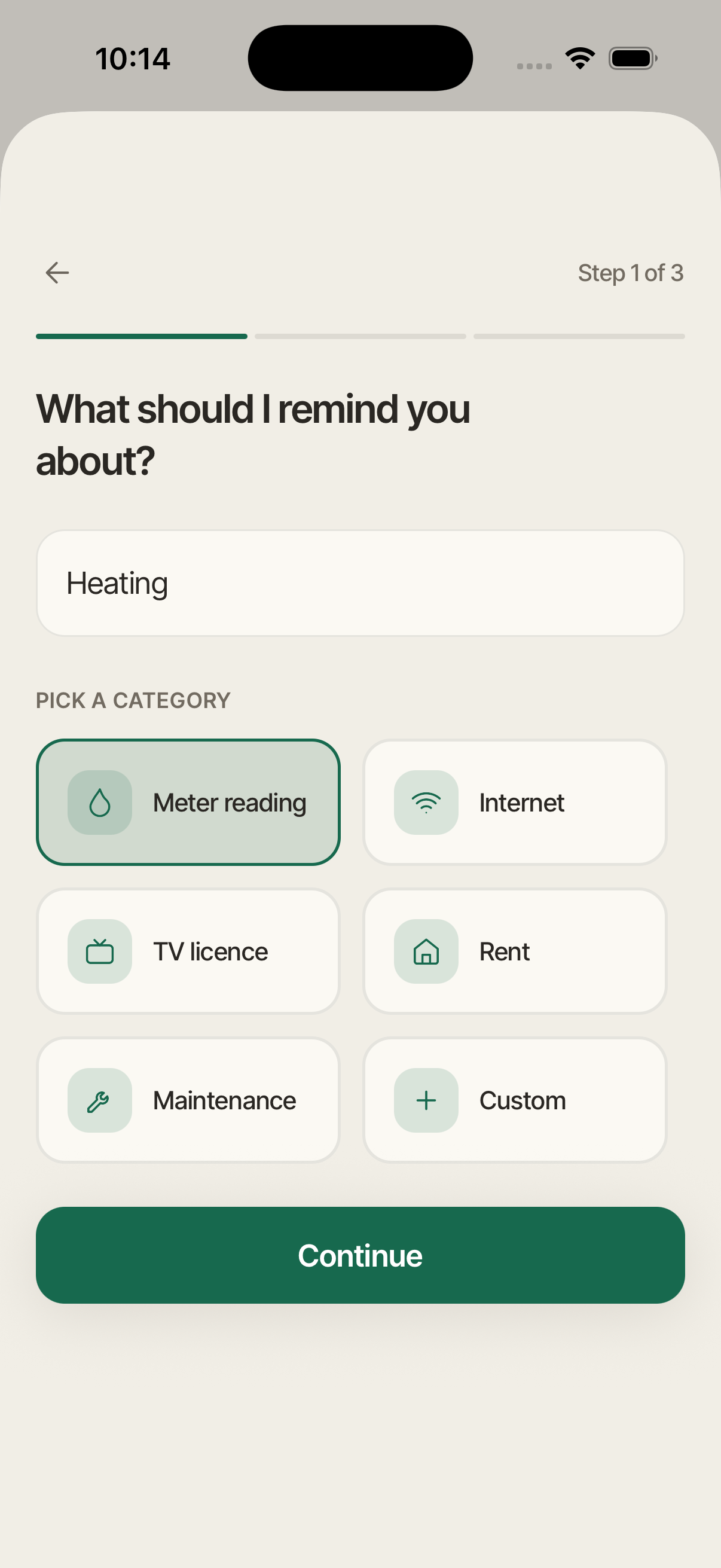
Step 1: what
Give it a name. Whatever you'd call it in your head.
Pick a category. Meter reading, utility bill, electricity, internet, TV licence, rent, maintenance — or your own.
Three steps, that's it. The progress bar tells you exactly how much is left.
02 · CREATE, STEP 2
Step 2: when
A window, not just a date. Set the day it opens and the day it closes — the way meter-reading periods actually work.
Repeat as often as it happens. Once, monthly, every two months, or quarterly.
Add a payment step. Expect an amount, or set a price per unit and Medori pre-fills the total from your reading.
“Here's what I'll do”. Before you save, it says the plan back to you in plain words: “I'll notify you twice each month — on the 25th, and again on the 27th, both at 10:00, if you haven't marked it done.”
02 · CREATE, STEP 3
Step 3: anything to keep with it
A photo. The meter, the receipt, the letter.
A note or a link. Account numbers, the provider's portal.
All optional. Skip it now, add it later.
Section 03 — Acting on it
Reading, payment, or just done.
03 · COMPLETE
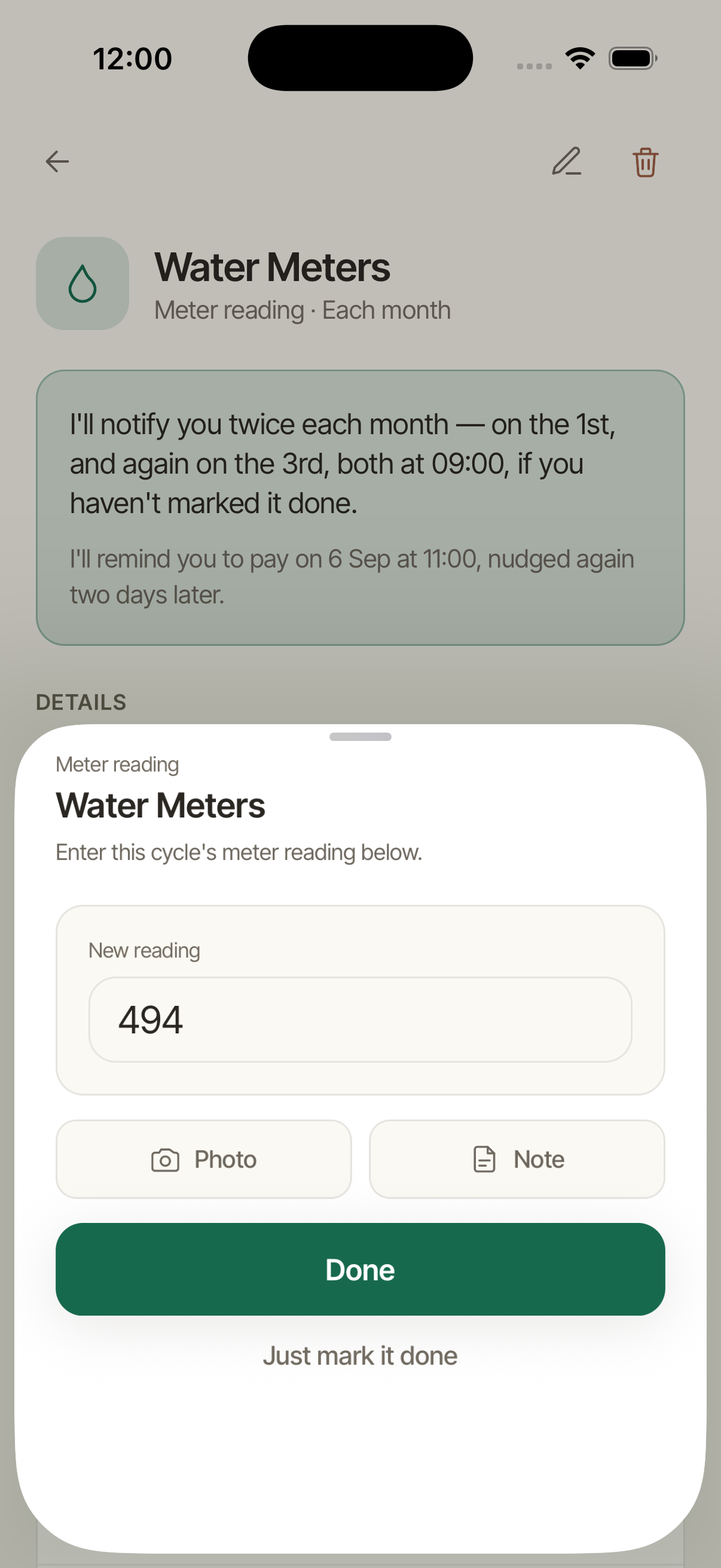
Marking it complete
Enter the reading. This cycle's number, logged and kept.
Attach as you go. A photo or note goes with the entry, not just the reminder.
03 · DETAIL
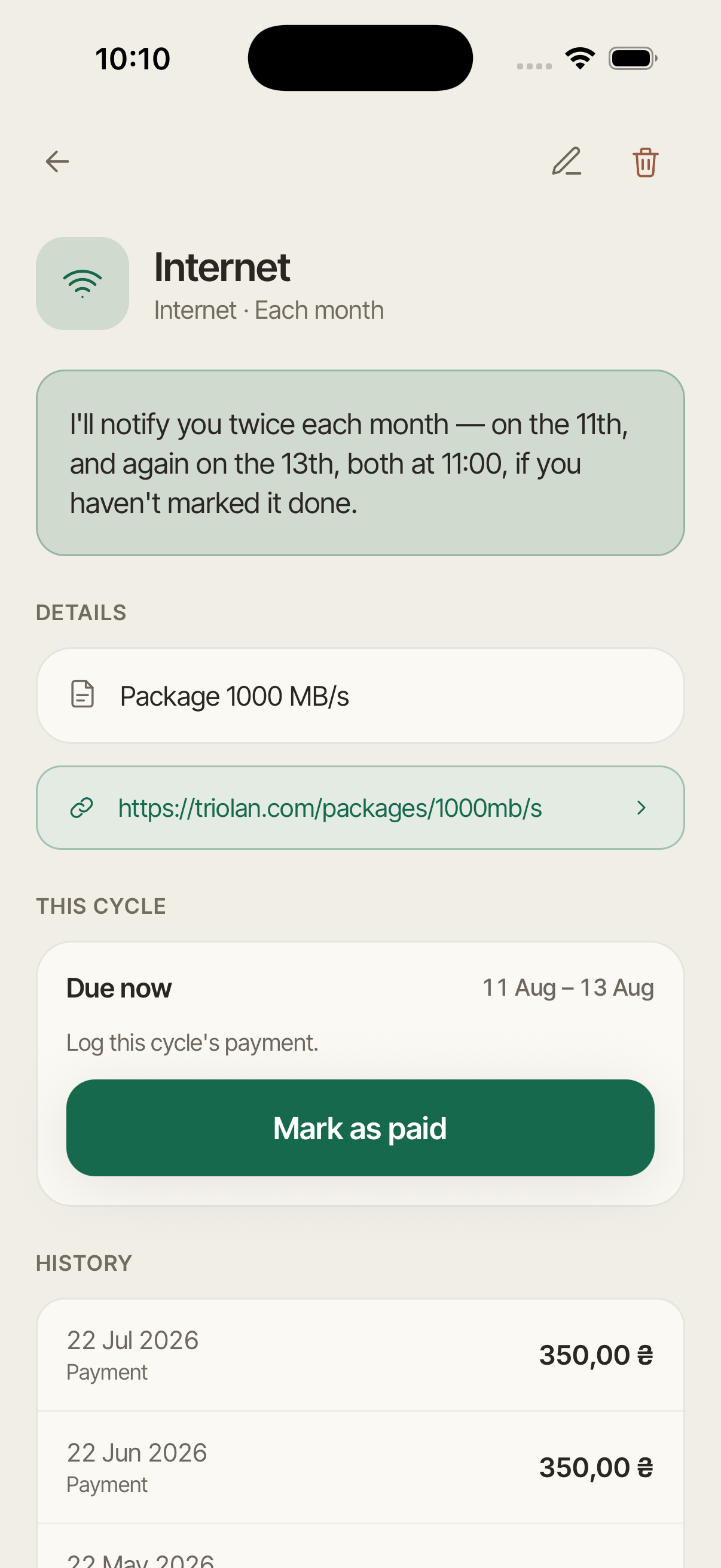
The reminder's own page
This cycle. What's outstanding right now, and how long you still have.
What happens next. “Next payment is due by 22 July.” Always one line, always current.
Its own history. Every past cycle for this one reminder.
Section 04 — Looking back
Where it all went.


04 · HISTORY
History
Every entry you've logged. Readings and payments, newest first.
Filter it down. By reminder, when the log gets long.
Open any entry. The amount, the reading, the photo, the note — exactly as you left it.
04 · ANALYTICS
Analytics
Spending by month. What these obligations actually cost you.
By category. Where the weight sits.
Consumption over time. Meter readings plotted, so a jump is obvious.
Section 05 — Making it yours
Set it up once, and forget the app exists.

05 · SETTINGS
Settings
Quiet hours. Reminders that would fire overnight are held and delivered when the window ends.
Your currency. Every amount shown the way you think about money.
Your language. English, Українська, Русский.
Export history. The whole log to CSV, with Pro.
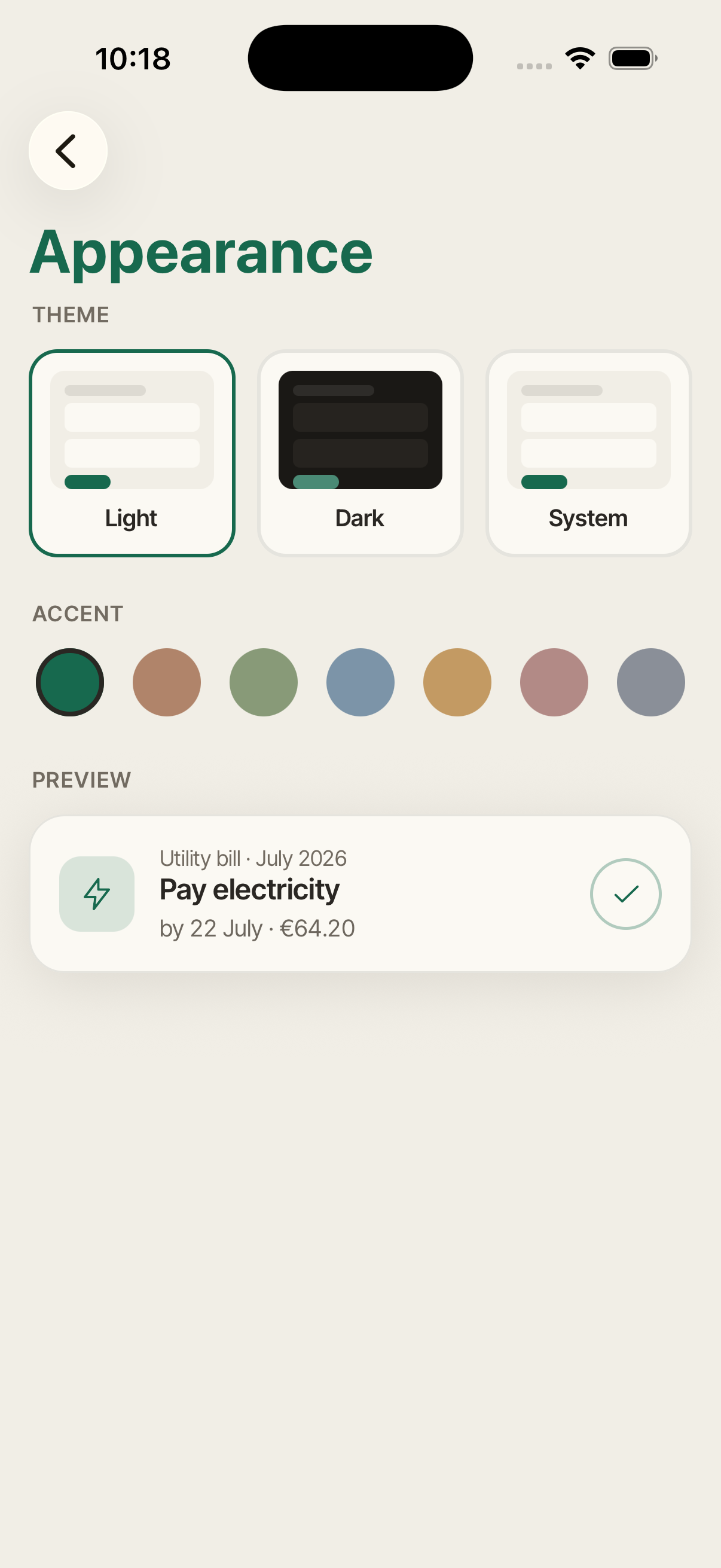
05 · APPEARANCE
Appearance
Light, dark, or system.
Seven accents. Pine, clay, sage, blue, amber, rose, slate.
Live preview. The change is shown on a real reminder card before you commit.
Pricing
Free
- Up to 5 active reminders
- Full notifications, offline mode, sync, themes, all languages
- Analytics for the last 3 months
Medori Pro
Monthly · Yearly · Lifetime
- As many reminders as you need
- Analytics for the whole period
- History export to CSV
- New Pro features as they ship
See current pricing in the app — App Store.
Losing Pro never takes your reminders away — if your subscription lapses you keep every reminder you made and they keep notifying you. You just can't add a new one until you're back under the free limit.
Frequently asked questions
Do I need an account?
Yes, sign in with Apple or Google so your reminders aren't lost. There's no password to remember.
Does it work without internet?
Yes. Everything is stored on your device; sync happens when a connection is available.
What if I miss a notification?
Missed reminders stay on your Home screen under "Missed" until you handle them.
Can I use it for things that aren't bills?
Yes. Any recurring obligation with a deadline: meter readings, rent, subscriptions, maintenance.
What happens if I stop paying for Pro?
You keep every reminder you already made, and they keep notifying you.
How do I delete my data?
Settings → Delete account. Everything is erased after 30 days; sign in before then to restore it.
- No ads, no trackers, no data sold. The site itself sets no cookies.
- Your reminders live on your device first, in a local database. Sync is a convenience, not a requirement.
- Photos never leave your phone. A meter or receipt snapshot is stored locally; only its reference is synced.
- Delete your account whenever you want, from Settings. Reminders stop immediately; everything is permanently erased after 30 days.